What to do with 15 minutes, before the phone decides for you
For anyone who has a quarter of an hour before the next thing and spends it scrolling, again. Why small windows of time go to the phone, and how to use them well with a short list you made in advance.
Left to the phone
Quick checks, one after another. Nothing done, not rested.
Decided in advance
One thing from the 15-minute list, done in eight. Then a short rest, and three minutes to get ready.
The gap that disappears
Your call starts at 14:00. It’s 13:46. Too little time to start anything real, you think, too much to just sit there. So you pick up the phone. At 13:59 you put it down, a little more scattered than before, and the thing you’ve been meaning to do for two weeks is still not done.
Days are full of gaps like this. The wait before a meeting, the doctor running late, the pasta water that won’t boil, the train that’s eleven minutes out. One gap doesn’t matter. Five of them a day add up to more than an hour that mostly goes nowhere, neither rest nor progress.
This guide isn’t about squeezing more work out of every minute. It’s about making those gaps yours again, for a small task or for a real break, instead of losing them by default.
Why small windows go to the phone
Partly because doing nothing is genuinely hard. In a well-known series of studies published in Science, participants typically didn’t enjoy spending 6 to 15 minutes alone in a room with nothing to do but think. In one study, people sat alone for 15 minutes with a button that gave them a mild electric shock. Before, they had said they would pay money not to be shocked again. Even so, 12 of 18 men and 6 of 24 women pressed it at least once. The authors’ conclusion: most people seem to prefer doing something to doing nothing, even something unpleasant.
The phone is the easiest something there is. Researchers who logged how people used their smartphones described a “checking habit”: quick looks at email, news or social apps, typically under 30 seconds, often set off by a context like being bored. The people in the study didn’t call it addiction. They called it a nuisance. That fits the gap: nobody decides to scroll for 14 minutes. You check one thing, and then another.
But the main reason is simpler. The decision costs more than the window. To use 15 minutes well, you first have to think of what fits, what’s possible here, what you’re in the mood for, and whether it’s worth starting. That can take five of the fifteen. The phone skips all of it.
With ADHD, that deciding step can be the hardest part. The NHS lists “finding it hard to organise your time” among the signs of ADHD in adults. If you suspect that’s you and it affects your work, studies or relationships, the NHS suggests talking to your GP.
One more thing: the phone isn’t much of a break, either. In an experiment with 414 students solving word puzzles, those who took their mid-task break on a phone were slower and solved fewer puzzles afterwards than those who took the same break on a computer or on paper. On speed, they did no better than people who had no break at all.
Decide before the gap shows up
The fix is to move the decision out of the gap. Make it once, at a calm moment, so that when the window opens, you only have to start.
Psychologists call this kind of plan an implementation intention: an if-then plan that links a situation to an action in advance. A meta-analysis of 94 tests found that such plans had a medium-to-large effect on reaching goals. The research wasn’t about waiting rooms, but the idea transfers well. For example:
- “If I’m early for a meeting, I do the first thing on my 15-minute list.”
- “If I’m waiting at the doctor’s, I answer the one message I’ve been avoiding.”
- “If the kettle is on, I clear the sink.”
The “if” is the gap. The “then” has to be ready before it arrives. That’s what the lists are for.
Keep a short list by duration
Most to-do lists are sorted by importance or by project. In a 15-minute gap, neither helps. What you need to know is what fits. So keep a second, tiny list sorted by time:
- Three buckets: 5 minutes, 15 minutes, 30 minutes. Most gaps land in one of these.
- Five items per bucket, at most. A long list is just another decision.
- Concrete and finishable. “Call the dentist” works. “Sort out health stuff” doesn’t. If you can’t tell when it’s done, it doesn’t belong here.
- Matched to where you are. A gap at home allows chores; a gap at the station allows calls, messages and reading. Mark the few that work anywhere.
- Somewhere you’ll see it. On paper in your wallet, a note on your lock screen, the back of a notebook. If you have to search for the list, the phone wins.
-
5min
- Answer the one message
- Reorder coffee filters
- Empty the dishwasher
- Stand up, stretch, drink water
-
15min
- Call the dentist
- Clear the desk
- Fold one load of laundry
- Walk around the block
-
30min
- Draft the hard email
- Change the bedding
- Cook for two meals
- Make tea, drink it while it’s hot
Works anywhere, not just at home
Estimate generously. Most things take longer than we think, and a task that runs over the gap is worse than one that ends early.
One thing only
When the window opens, take one task from the bucket that fits, the first one you’re willing to do. Don’t reorder the list, don’t look for the best option. The first acceptable one is the right one.
And pick something you can finish. Starting a big task in a short gap has a hidden cost. In experiments by the organisational researcher Sophie Leroy, people struggled to pull their attention away from work they hadn’t finished, and the next task suffered. If you open the hard report at 13:46, part of your head is still in it at 14:00, and your call gets the leftovers.
Two more rules help:
- Leave a buffer. If the meeting is at 14:00, your task ends at 13:57. Three minutes to wrap up, get there, open the link.
- Done early? Then you’re done. You don’t owe the remaining minutes anything. Take another small one if you feel like it, or just sit.
And if the gap comes right before something that matters, the best task might be that thing: read the agenda, write down three points, find the room. Using the gap for the next thing is using it well.
Things to do in 5 minutes
- Answer the one message you’ve been putting off. Just that one.
- Put a date into the calendar that you’ve been carrying around in your head.
- Reorder something that’s about to run out: contact lenses, coffee filters, printer ink.
- Empty the dishwasher, or clear the sink.
- Take out the bin or the recycling.
- Water the plants.
- Write tomorrow’s first task on a sticky note and put it where you’ll start.
- Drink a glass of water, stand up, stretch.
If a task needs the phone, open the one app it needs, do it, and put the phone face down. The task is the plan, not the phone.
What to do with 15 minutes
Fifteen minutes is long enough for real progress on a small thing. Some productive things to do in 15 minutes:
- Make the call: dentist, GP, insurance, the landlord. Most of these only answer during office hours, which is exactly when gaps happen.
- Pay one bill, or file one pile of paper.
- Clear one surface: the desk, the hallway shelf, the chair with the clothes on it.
- Fill in one form you’ve been avoiding.
- Fold one load of laundry, or hang one up.
- Write the first three bullet points of the email or document you keep postponing. Just the outline.
- Pack tomorrow’s bag, or the gym bag.
- Prepare one part of dinner: wash the vegetables, take something out of the freezer.
- Walk around the block.
What to do with 30 minutes
- Vacuum, or clean the bathroom.
- Change the bedding.
- Go through the fridge, write the shopping list, order or plan the shop.
- Sort the week’s mail and paperwork.
- Take the parcel back, if the drop-off point is close.
- Draft the hard email, all of it, without sending.
- Cook something that lasts for two meals.
- Look at the next seven days and drop two or three to-dos into open spots.
Rest counts too
Not every gap needs a task. Sometimes the most useful thing to do with ten minutes is to recover. A meta-analysis of 22 samples found that short breaks of up to ten minutes left people with more energy and less fatigue. They didn’t reliably improve performance, except on less demanding tasks, but feeling less worn out is reason enough.
The difference between rest and the phone is that rest is chosen. So put a few restful things on your lists, too: step outside, look out of the window, close your eyes for five minutes, make tea and drink it while it’s hot. When small things to do when bored are already written down, “bored” stops being the cue for the phone.
Set up your gap lists
- Write three headings: 5 min, 15 min, 30 min.
- Under each, write up to five tasks you could finish in that time, generously estimated.
- Add one restful option to each list.
- Mark the ones that work anywhere, not just at home.
- Put the lists somewhere you’ll see them in a gap.
- Write one if-then plan: “If I’m early for a meeting, I do the first thing on the 15-minute list.”
- In the gap: one task, finish it, stop three minutes before the next thing.
- Once a week, cross off what’s done and refill from your main to-do list.
When something else picks the task
The lists work on paper. Keeping them current is the part that tends to slip, and in the moment, even choosing from five items is a choice. That’s why we built Sidequests into Not Yet, an iPhone and Apple Watch app built with ADHD in mind. It does the matching for you.
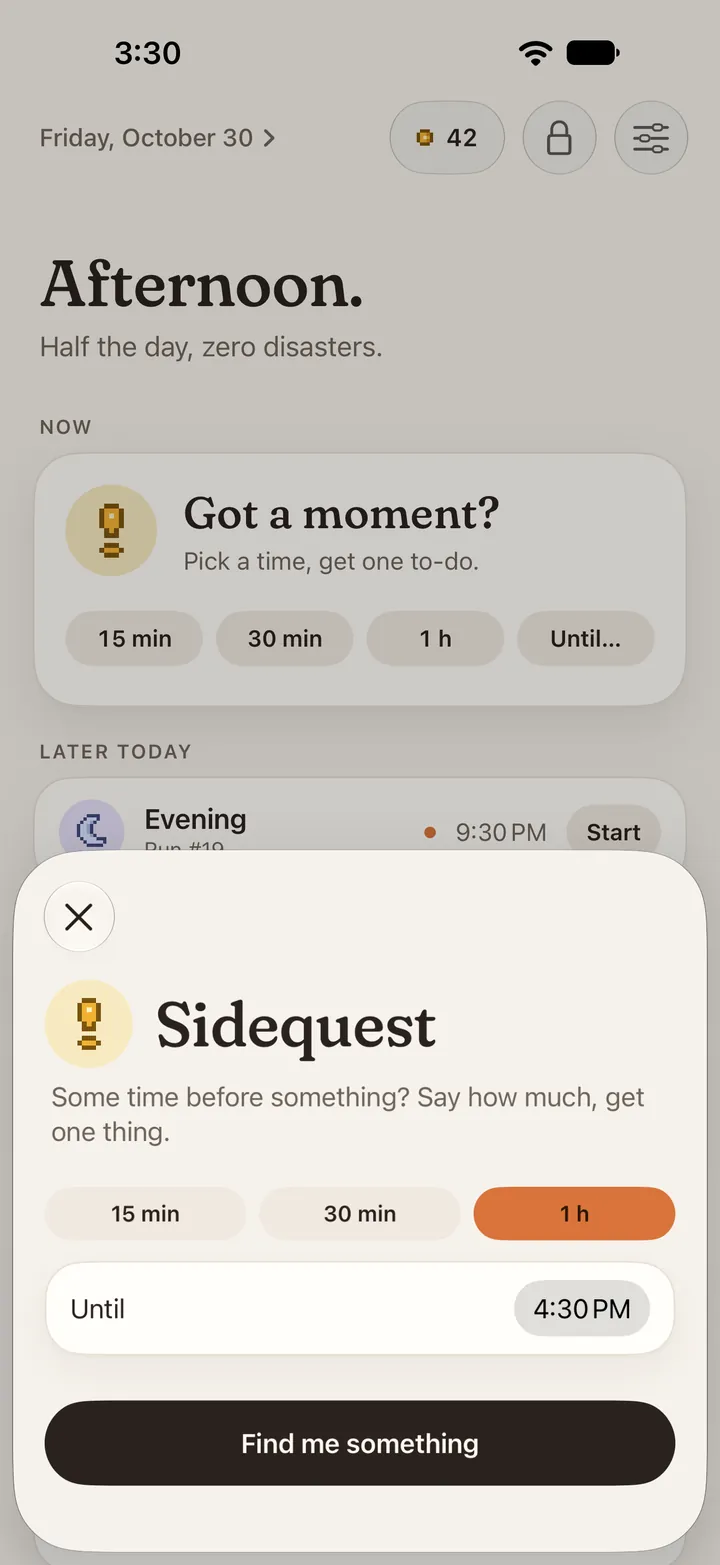
- “Got a moment?” When no routine is up, that’s what the app asks. Pick a time, 15 min, 30 min or 1 h, or “Until” a time, and you get one to-do that fits. It comes as a card you turn over. Don’t want it? Tap “Something else.”
- Every to-do has a size. When you add one, you set roughly how long it takes, in quarter hours. That size is only used to pick sidequests that fit your time. There’s no timer.
- The buffer is built in. Pick “Until” a time, and the sidequest ends ten minutes before it, so you get going on time. With Plus, Not Yet can also read your calendar (it stays on your iPhone): the card then says how many minutes you have, and sidequests end before your next appointment.
- A nudge when time’s up, and no pressure if you need longer: “Keep going if you need to.” Done early with nothing else that fits? “The time is yours.”
To-dos without a deadline can also go into an open spot in your week, “roughly then”. The week page shows how to-dos and sidequests fit together, and the Not Yet home page has the rest. If your phone gaps tend to stretch into the evening, the guide to scrolling at night picks up from there.
By hand or with an app, the idea stays the same: decide once, keep it short, and when the gap opens, do one thing.
Sources
- Science: Wilson et al., Just think: The challenges of the disengaged mind (2014), with full text
- Aalto University via EurekAlert: Study exposes habit formation in smartphone users (2011), on Oulasvirta et al., Personal and Ubiquitous Computing
- NHS: Attention deficit hyperactivity disorder (ADHD) in adults (reviewed 2025)
- Journal of Behavioral Addictions: Kang and Kurtzberg, Reach for your cell phone at your own risk: The cognitive costs of media choice for breaks (2019)
- Advances in Experimental Social Psychology: Gollwitzer and Sheeran, Implementation intentions and goal achievement: A meta-analysis of effects and processes (2006)
- Organizational Behavior and Human Decision Processes: Leroy, Why is it so hard to do my work? The challenge of attention residue when switching between work tasks (2009)
- PLOS ONE: Albulescu et al., “Give me a break!” A systematic review and meta-analysis on the efficacy of micro-breaks for increasing well-being and performance (2022)
This guide shares everyday strategies. It is not medical advice and doesn’t replace a diagnosis or treatment. If something here sounds familiar, a doctor or therapist can help.