Coin lock
Earn your screen time. One coin, one minute.
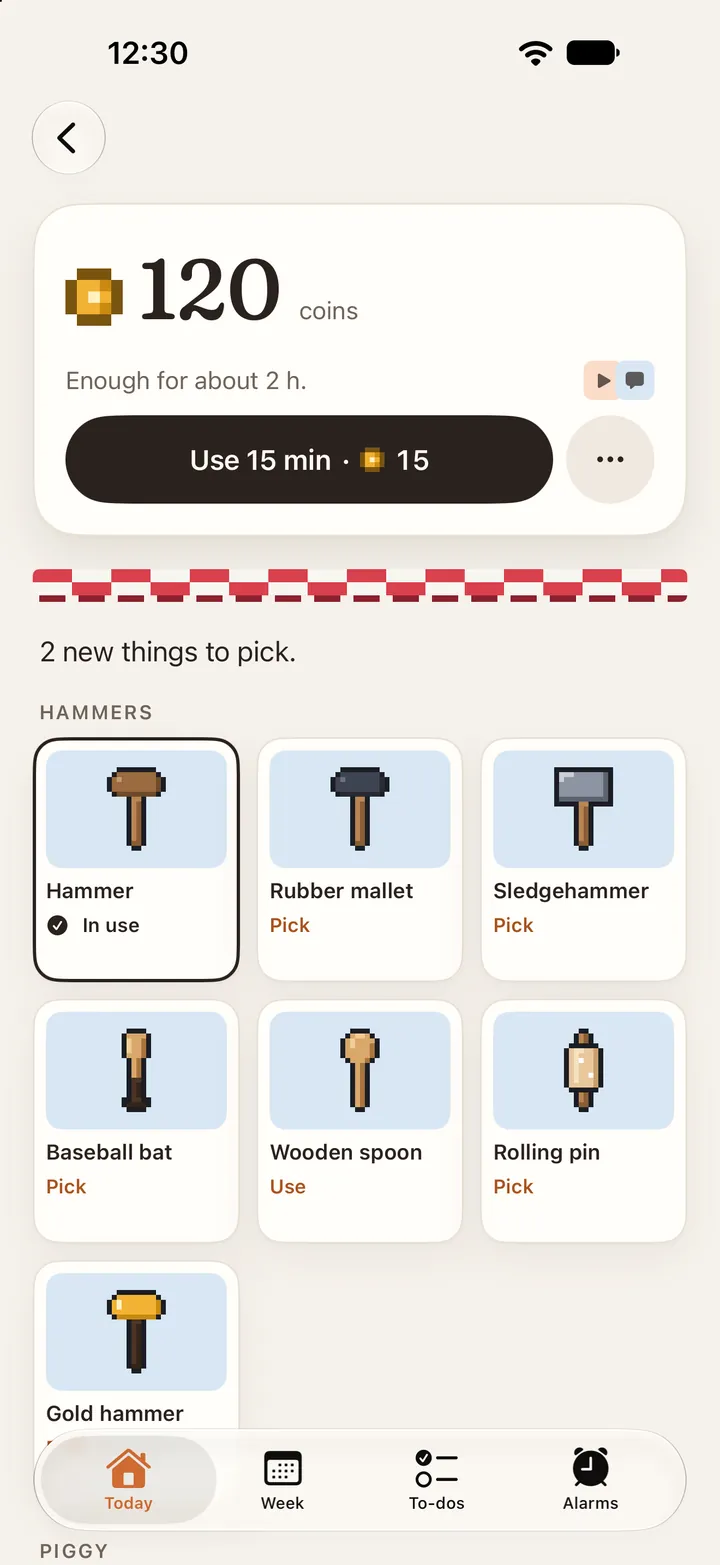
Coin lock keeps the apps you pick locked, like Instagram or TikTok. They open with coins, and you earn coins by doing your routine and your to-dos. It’s for adults who set it up for themselves, not parental control.

A limit is easy to tap away.
A daily limit asks once, and one more tap makes it go away. A full block is all or nothing, so it’s the first thing to go on a long day.
Coin lock sits in between. Your apps stay usable, but they cost something you only get by doing: a step of your morning routine, a to-do, a glass of water. Screen time becomes the reward, not the default.
1coin = 1minute
Do a step
A routine step, a to-do, a glass of water.
Earn coins
Earned, never bought. There’s no way to pay for them.
Tap “Use 15 min”
15 coins for 15 minutes.
Your apps open
Shared by all your Coin lock apps, in pieces if you like.
Earn coins. Spend minutes.
Pick the apps once. From then on, they stay locked until you do something.
Earned, never bought.
Routine steps, to-dos, sidequests, water and walking earn coins. There’s no way to pay for them.
1 coin, 1 minute.
One tap on “Use 15 min” spends 15 coins and opens your Coin lock apps for 15 minutes of use.
In pieces, across apps.
The minutes are shared by all your Coin lock apps and don’t have to be in one go: five minutes of Instagram now, ten of TikTok tonight.
Two apps without paying.
Coin lock works for up to two apps, in 15-minute blocks. Plus adds any number of apps, categories and websites, and blocks of 10, 15 or 30 minutes.
Less than a block left?
Use what you have. 7 coins open 7 minutes.
When you reach for a locked app.
It shows what it costs and how many coins you have. Then there are two buttons.
“Not yet”
The main button closes the app. Sometimes that’s all it takes.
“Use 15 min”
The second button opens your apps right there, without a detour through Not Yet.
Out of coins?
The screen says so, calmly. The second button then reads “Show me one” and suggests a quick to-do that brings new ones.
Turning it off takes 30 seconds.
Switching it off, “Off for today” or taking apps out means holding until a ring fills: 30 seconds. Long enough to change your mind. “Off for today” lasts until midnight.
Other locks come first.
During Focus lock or Bedtime lock, your apps stay locked, coins or not. An open block pauses and picks up afterwards.
Messages and calls always stay open.
Off for today?
Until midnight, your apps open without coins.
12hold
Hold until the ring is full.
CancelNot Yet never sees your apps.
You pick them in Apple’s own picker, and iOS keeps your choice on your iPhone in a form Not Yet can’t read. iOS only tells Not Yet when your minutes are used up, not which app you used. No account, no ads.
Questions? Answers.
Is Coin lock parental control?
No. It’s screen time for adults, set up by you, for you, on your own iPhone. You pick the apps, you earn the coins, and you can turn it off with a 30-second hold.
Can I lock Instagram, TikTok or YouTube?
Yes, any app you pick in Apple’s picker. With Plus, also whole categories, like social networks or games, and websites.
How do I earn coins?
By doing things in Not Yet: routine steps (one golden step per run earns more), to-dos, sidequests, glasses of water and walking. A to-do counts once it’s been on your list for ten minutes. Coins can’t be bought.
What if I really need an app?
Messages and calls always stay open. For everything else, “Off for today” in Not Yet turns Coin lock off until midnight, after a 30-second hold.
Does it work with Focus lock and Bedtime lock?
Yes. The stricter lock wins: during Focus lock or at night, your apps stay locked even if you have coins. An open block pauses and continues afterwards.
Is Coin lock made for ADHD?
It was built with ADHD in mind: coins arrive the moment you finish something, and you decide about the feed once, not every time you pick up your phone. It works the same for anyone who wants less screen time.
Guides
Screen time as a reward: how it works for adults, and when it backfires
Feed after the to-do: how earning your own screen time works, the ways to set it up, and when it backfires.
9 min readWhen the day won’t end: how to stop scrolling in bed
Why the evening frays into the feed, and how to give it a real ending, with or without an app.
9 min readWhy routines get boring with ADHD, and how to keep one anyway
Your routine lasts ten days, then it’s gone? Why that happens with ADHD, and how to keep the steps while changing the game.
9 min read