Screen time as a reward: how it works for adults, and when it backfires
For adults who don’t want to quit their apps, just stop opening them by default. How to earn screen time, what the research says, the different ways to set it up, and the mistakes that make people give up on it.
Looser
Stricter
-
Daily limit
Asks once. On a tired evening, one tap and it’s gone.
-
Earned time
The apps stay usable, but only with minutes you got by doing something.
Task done+15 min
-
Full block
All or nothing. The day you really want five minutes, the whole block goes.
What “earning” screen time means for adults
Search for “earn screen time” and you mostly find chore charts for kids. This guide is about something else: adults who set it up for themselves, on their own phone, because they want the feed to come after the day’s things, not instead of them.
The idea is simple. A few apps you tend to lose time in, say Instagram, TikTok or YouTube, stay locked. They open with time you’ve earned by doing something you meant to do anyway. You don’t give the apps up. They just stop being the default.
That puts earning somewhere between the two usual tools:
- A daily limit asks once, and one more tap makes it go away. On a tired evening, that tap is easy.
- A full block is all or nothing. It works until the day you really want five minutes, and then the whole block goes.
- Earned time keeps the apps usable, but gives them a cost you can only pay by doing.
Adults do want this kind of help. In a large experiment with about 2,000 American adults on Android phones, economists offered a tool for setting daily app limits that, unlike the flexible limits built into phones, mostly couldn’t be overridden on the spot. Nobody was paid to set limits, yet 78 percent set limits that actually stopped them and kept using them until the end of the study. Use of the tempting apps fell by 22 minutes a day, about 16 percent. On average, participants said access to the tool was worth $4.20 to them for three weeks.
Does screen time as a reward work?
There isn’t much research yet, but one trial tested almost exactly this. In StandUPTV, 110 adults who spent more than three hours a day sitting in front of screens outside work used a study app for 16 weeks. Everyone got self-tracking, a goal to halve their screen time and some educational material. Some also got extra components, switched on or off at random. One of them was earning: 10 minutes of brisk exercise, counted by a fitness tracker, earned 30 minutes of screen time.
On average, participants started at about 185 minutes a day, and screen time fell in almost every version. The basic version alone was expected to cut it by about 88 minutes a day. With earning as the only extra, the expected drop was about 118 minutes, and the version that combined earning with a lockout and text prompts came out on top at about 126. Earning didn’t help in every combination, though: paired with text prompts alone, it did worst of all. Participants with earning also stayed in the study more often, 77 percent compared with 70 percent, and 69 percent of them called it very helpful.
Read it with care. The study was small, 82 percent of participants were women, and screen time meant TV and a study tablet, not people’s own phones. Still, it’s a promising first signal that earning can work for adults. And several participants found 10 minutes for 30 too generous.
The same economics experiment adds a second hint. People who were paid for a few weeks to use social media less kept using it less after the payments stopped: 19 minutes a day less in the following three weeks, 12 minutes after that. The authors read this as a sign that these apps are habit-forming. What you practise for a while tends to stick.
There’s also a reason earning may suit ADHD. A meta-analysis of 37 comparisons with 3,763 participants found that people with ADHD more often chose a small reward now over a larger one later. The effects were small to medium. Earned minutes are a small reward right away, not a vague payoff at the end of the month.
How to earn screen time: three ways to earn, two ways to spend
Every setup has two halves: what earns time, and how you spend it. Each option has a place where it tends to break.
Earn with movement
Steps, a walk, a workout. The appeal is clear: you get the movement whether or not you spend the minutes, and a fitness tracker or phone counts it for you. The weak spots: some days you can’t move much, because of illness, weather or a long shift. And movement earns time no matter what else you’re avoiding. You can walk off the screen time and still not open the email.
Earn with tasks and routines
A step of your morning routine, a to-do, a glass of water, ten minutes of tidying. This ties the reward to exactly the things that get pushed aside by the feed. The weak spot is honesty. If you check off the task yourself, you can check off things you didn’t do, or break one task into twelve to earn more. Decide in advance what counts, and keep the list short and real.
Earn with focus time
A timer runs while you work, and focused time turns into screen time. Good for desk work and studying, where there’s no clear “done.” The weak spot: a running timer isn’t the same as work done.
Spend in fixed windows
You unlock the apps for a set block, say 15 or 30 minutes, and they lock again when the time is up, whether you used it or not. Simple, with a clear end to every session. The downside: checking one message eats a whole block.
Spend minute by minute
Here earned time works like a balance. Each minute in a locked app costs one unit, and what you don’t use stays for later. Five minutes now, ten tonight. It’s fairer to short visits, but it needs a clear exchange rate and a visible balance, or it starts to feel like guesswork.
You check one message: 3 minutes out of a 15-minute block.
Fixed window
3 used, 12 gone
Minute by minute
3 used, 12 left for later
Set it up yourself, with or without an app
You can test the idea for a week before choosing any tool. Paper and a little honesty are enough.
- Pick one to three apps that take more time than you want. Leave messages, calls, maps and anything you need for work alone.
- Write down what earns time: three to five things you tend to put off. Not things you already enjoy.
- Set an exchange rate, for example one finished task for 15 minutes. On an ordinary day, you should earn roughly what you’d like to use.
- Keep a visible balance: tally marks on a card, coins in a jar, a note on the fridge.
- Decide now what happens when you run out: the apps wait until you’ve done one more thing.
- After a week, adjust the rate once. Then leave it alone for a while.
The paper version has one obvious gap: nothing stops you from opening the app. That’s where an app helps. It holds the line you drew in daylight when you no longer want to.
When earning screen time backfires
Most setups fail in a few predictable places.
- The rate is off. Too generous, and nothing changes. Too strict, and you turn the whole thing off by Wednesday. Start where an ordinary day roughly balances out, then tighten slowly. The StandUPTV participants who found their rate too lenient suggested going from three minutes per minute of exercise to two.
- You reward what you already like. A meta-analysis of 128 experiments found that expected, tangible rewards tended to lower people’s interest in doing an activity for its own sake. The findings are debated, but the practical lesson is easy: don’t make reading for fun, playing guitar or a walk you love into a way to earn minutes. Put the things you avoid on the list.
- It turns into bookkeeping. If you spend more time counting than doing, simplify: one rate, a handful of things that earn.
- The exit is too easy. The real test of any lock isn’t the moment you set it up. It’s the evening you want to switch it off. If that takes one tap, it will happen on exactly the days it matters. A deliberate pause, half a minute you have to wait through, is enough to let the urge pass.
- Running out feels like punishment. Zero minutes isn’t a failure. It’s information: today the feed comes after one more thing. Bad days happen, and especially with ADHD, a setup that scolds you is a setup you’ll quit.
Why you shouldn’t be able to buy your way out
Some setups let you skip the earning part: pay a small amount, and the apps open anyway. That sounds harmless, but it quietly changes what the lock is.
A well-known field study shows why. Ten day-care centres in Haifa had a problem with parents picking up their children late. In six of them, the researchers introduced a small fine for parents who arrived more than 10 minutes late. Lateness didn’t go down. It rose steadily and settled at almost twice the earlier level. When the fine was removed, the late pickups stayed high. The authors’ explanation is in the title of their paper: “A fine is a price.” Once lateness had a price, parents could simply buy it, and, as the authors put it, no guilt or shame comes with buying something at will.
The same happens on your phone. If minutes can be bought, the lock stops being a decision you made for yourself. It becomes a price, and on a long, tired day, almost any price seems worth it. Earned time only works if the currency is effort. That doesn’t mean there’s no way out for real needs. A good exit is slow, not expensive: something you have to wait through, so an emergency gets through and an impulse usually doesn’t.
How Not Yet’s Coin lock does it
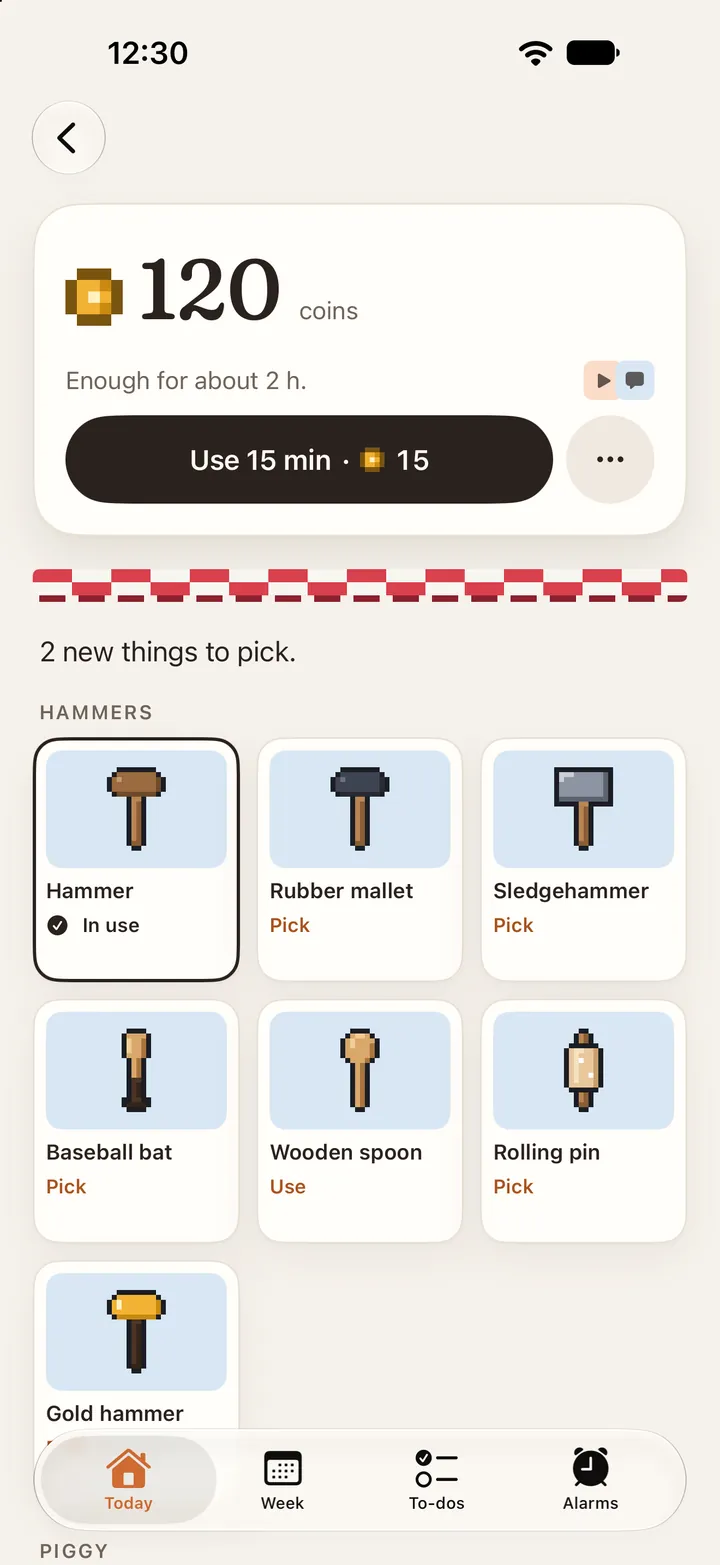
We built Not Yet with ADHD in mind, and its Coin lock is one way to earn your screen time on iPhone:
- Earned with what you’d do anyway. Steps of your routines, to-dos, sidequests, glasses of water and walking earn coins. A to-do only counts once it has been on your list for ten minutes, so you can’t add and check off things on the spot.
- One coin, one minute. One tap on “Use 15 min” spends 15 coins. The minutes are shared by all your Coin lock apps and don’t have to be used in one go. Less than 15 left? Seven coins open seven minutes.
- Never bought. There’s no way to pay for coins.
- A slow exit. Turning Coin lock off, or “Off for today” until midnight, means holding a button for 30 seconds. Messages and calls always stay open.
- Private. You pick the apps in Apple’s own picker, and Not Yet never sees which ones.
Coin lock works for up to two apps in 15-minute blocks without paying. Plus adds any number of apps, whole categories and websites, and blocks of 10, 15 or 30 minutes. For hours when apps should stay closed no matter what, there’s Focus lock and Bedtime lock in the app lock; Bedtime lock is part of Plus. And if the evening is when the feed wins, read how to stop scrolling at night.
Start this week
- Pick the one app that costs you the most time.
- Choose three things you keep putting off. Those earn time.
- Set a rate, for example one thing done for 15 minutes.
- Decide how you’ll leave the setup on a bad day: slowly, not with money.
- After a week, adjust the rate once.
Sources
- Keadle et al., International Journal of Behavioral Nutrition and Physical Activity: StandUPTV: a full-factorial optimization trial to reduce sedentary screen time among adults (2025)
- Allcott, Gentzkow, Song, NBER Working Paper 28936: Digital Addiction (2022; published in the American Economic Review)
- Marx et al., Journal of Attention Disorders: ADHD and the Choice of Small Immediate Over Larger Delayed Rewards: A Comparative Meta-Analysis (2021)
- Deci, Koestner, Ryan, Psychological Bulletin: A meta-analytic review of experiments examining the effects of extrinsic rewards on intrinsic motivation (1999)
- Gneezy, Rustichini, Journal of Legal Studies: A Fine Is a Price (2000)
This guide shares everyday strategies. It is not medical advice and doesn’t replace a diagnosis or treatment. If something here sounds familiar, a doctor or therapist can help.